Pointers need painters
Source: https://moabid.me/blog/pointers-need-painters/ Published: 2023-04-07 Domains: Systems Programming Topics: Memory Management Languages: C

Once upon a time in the land of C programming, there was a magical concept known as pointers. These were not ordinary variables, but rather they held special powers that allowed programmers to manipulate memory and access data in a way that was previously impossible. (I am such a good storyteller, right? Probably I should switch my articles lmao)
Imagine for a moment that you are a wizard, and you have a wand that can point to different locations in a magical book. Each location contains a spell that can do different things. This wand is similar to a pointer in C, which can point to different locations in memory, where data is stored.
In C, a pointer is a variable that holds the memory address of another variable. This memory address is like a unique identifier for a specific location in memory. Just like how the wand can point to different locations in the book, a pointer can point to different locations in memory, allowing the programmer to access and manipulate the data stored there.
When you first create a pointer, it doesn’t actually point to anything yet. It’s like having a wand with no magic, just a stick. You need to give it a value by assigning it the memory address of another variable. This is done using the “address-of” operator, denoted by the ampersand symbol “&”.
For example, let’s say you have a variable called “number” that stores the value 42. You can create a pointer to this variable by declaring a variable of the same data type as “number”, and then assigning it the address of “number” using the “&” operator:
int number = 42;
int *pointer = &number;
Now, “pointer” holds the memory address of “number”, and you can use it to access and manipulate the value stored in “number”.
To access the value stored in the memory location pointed to by a pointer, you use the “dereference” operator, denoted by the asterisk symbol “\*”. This operator tells the computer to retrieve the value stored at the memory address pointed to by the pointer.
For example, if you want to retrieve the value stored in the memory location pointed to by “pointer”, you can do so like this:
int value = *pointer;Now “value” holds the value 42, which is the value stored in the memory location pointed to by “pointer”.
A wise old programmer once said, “Pointers need painters.”
. . . . . That’s me : p
You see, to truly grasp the concept of pointers, one must first visualize how they look and how they are pointing to what.
In this world of programming, it is important to be able to draw diagrams that illustrate the memory locations and how they relate to the pointers. By doing so, the programmer can see exactly where the pointer is pointing and how it is manipulating the data stored there.
Once again, pointers are like swords in C, LEARN HOW TO USE THEM.
For instance, imagine a diagram with a variable named “x” that holds the value 10. The pointer “ptr” has been assigned the address of “x” using the “&” operator. The painter can illustrate this relationship with a simple diagram that shows “x” as a box with the value 10 inside, and “ptr” as an arrow pointing to the box.
If you didn’t understand check this picture :
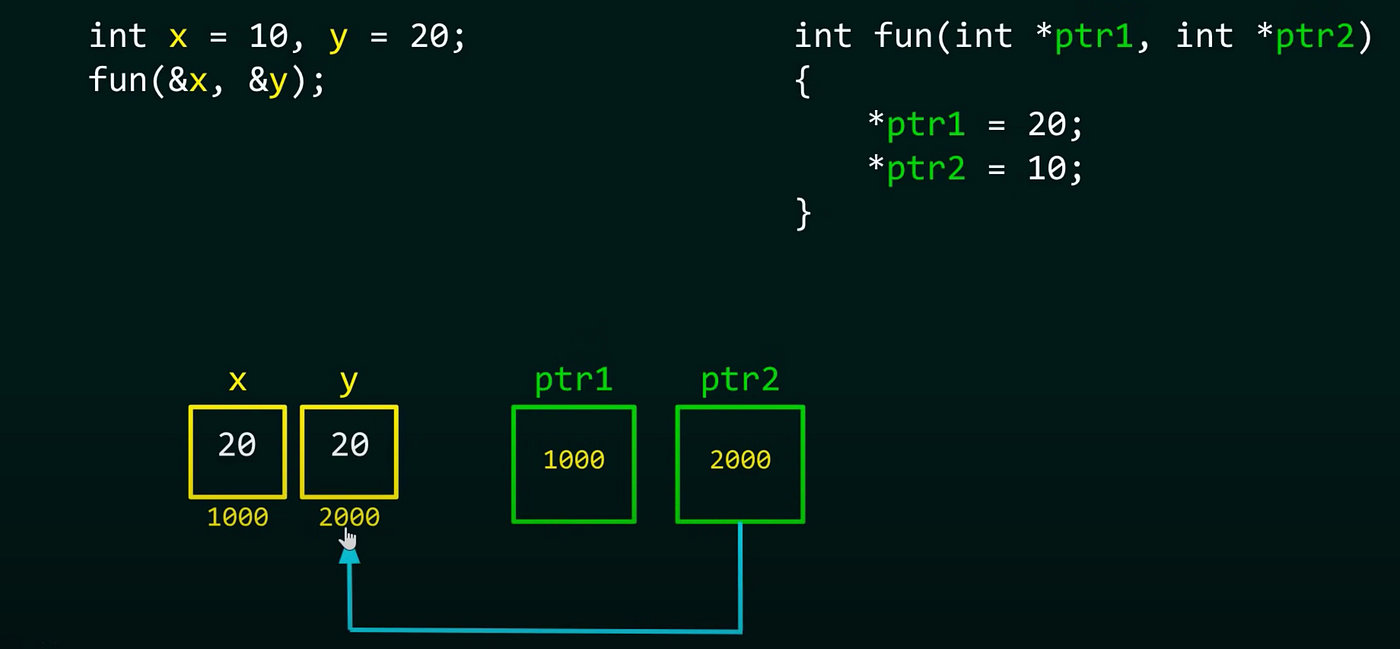
As you can see from this picture, I always try to visualize, what are these pointers storing and where are they pointing. In the previous image we assume that 1000 and 2000 are magical addresses where our beautiful variables are living happily, while on the other hand the ptr1 and ptr2 are 2 Police officers holding, their cards and knowing where they live (Don’t be like these variables kids, don’t get caught by the cops 🤓).

Now, let’s say the programmer wants to change the value of “x” using the pointer. They can do this by using the dereference operator “\*”, which tells the computer to retrieve the value stored at the memory address pointed to by “ptr”. The painter can show this operation in their diagram by erasing the value 10 in the box and replacing it with the new value assigned to the pointer which is 20.
By drawing these diagrams, programmers can gain a deeper understanding of how pointers work and how they are manipulating data in memory. These visual aids allow the programmer to see the connections between variables and how they are being used in the program.
Ah, but as with any powerful magic, the power of pointers comes with great responsibility. Many beginner programmers often fall victim to common mistakes when working with pointers, leading to segmentation faults and bus errors that can cause their programs to crash.
Okay now enough from our Fairy tails, let's get a little bit serious:^(
Pointers concept as a piece of cake
People don’t understand what is the meaning of a 2-dimensional array, and that’s why they confuse triples or n times pointers with black magic. As long as you understand how it actually works you will never have a problem even when your pointer looks like this :
char \\\\\\\\\\\\\\\\\\p
It’s the same concept, anyways get your shit together, and let's break it down …
This is a one-dimensional array:
char *str = "Hii";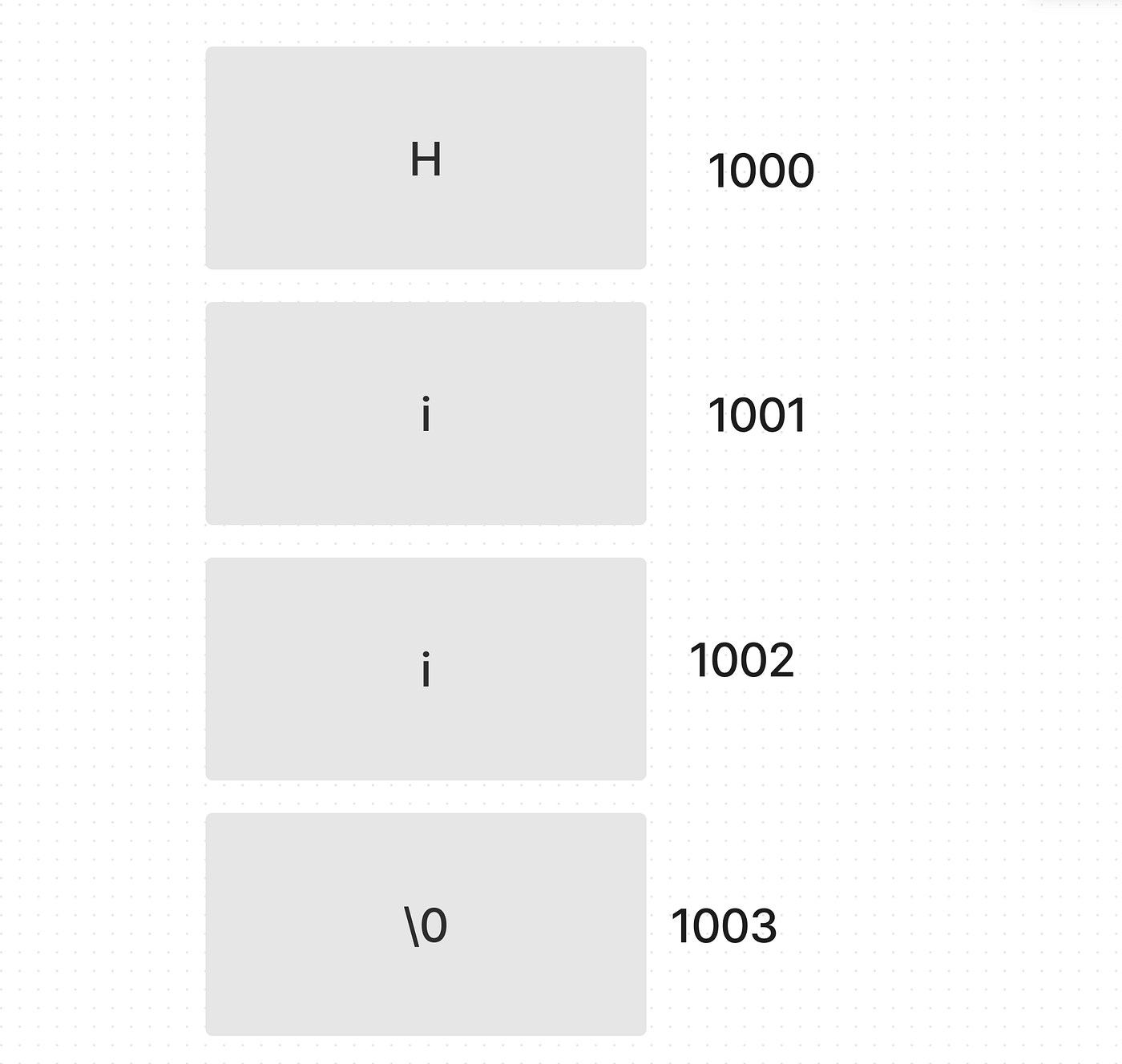
The offset between every address is 1, cuz the type of our pointer is : char , yes this char int double … defines the type of the pointer (or better say the size of each chunk of the memory, in the memory context, if you don’t understand the memory, go check “Did someone say memory”, I dove into that).
Next, let’s explain double dimensional pointer :
char **array_of_strings;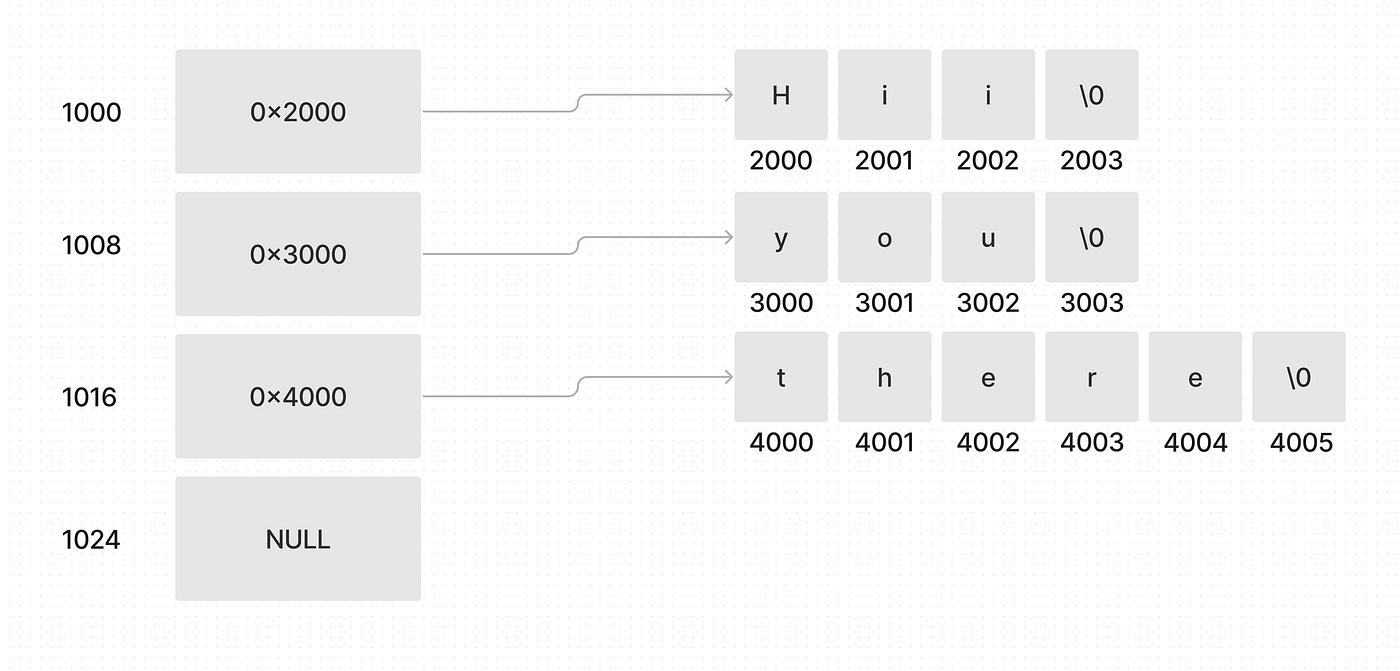
We have to address a few things here:
- I use 0x notation to make sure I mean by this value the address, not the number.
- The size of a pointer is always 8 it doesn’t matter if it’s with one star char \* or a million stars, that’s why I made the addresses, with their right offset. (offset is the space between each address).
- The pointer in address and a pointer in address 1008 aren’t pointing to the same place which means THEY ARE NOT LINEARLY UNDER EACH OTHER they are completely randomized (They take up any free space in the memory)
- The different between NULL and \0 is that \0 is one byte and NULL is 8 bytes.
- The pointer 0x2000 is pointing always to the first value of the string, if we get the head we can cross the whole array until we find the null terminator, or access by index, simply cuz we know how big is the memory so the C compiler is smart enough to calculate from where it should retrieve the data when you do : 0x2001 :)
- To use this kind of double-dimensional pointer, you have to allocate twice:
- First the number of addresses (0x2000, 0x3000 …)
- The second allocation is for the number of characters in each address.
Note: For the second allocation, it should be for every address (For 0x2000 , 0x3000, 0x4000) for every one of them you should allocate enough memory.
— — — — — — — —
Now that we have an understanding of double-dimensional pointers, let's check a triple-dimensional array, and project the rule, to work with any number of pointers: ^)
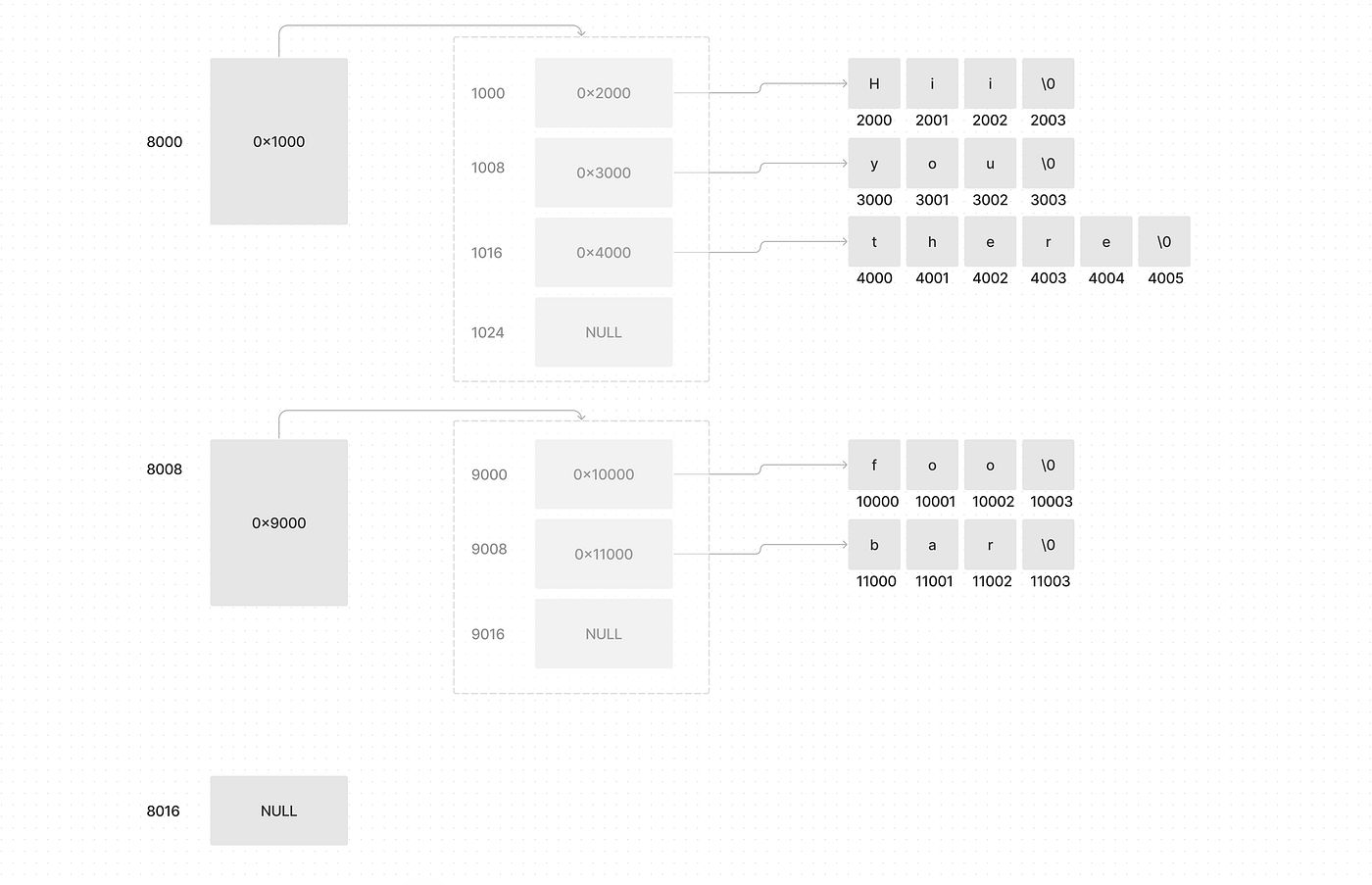
Again here, let's address a few things:
- The address 8000, 8008, and 8016 are linear, which means they are under each other.
- The transparent box is an abstraction to visualize that we can access all that space from that pointer, not only the first address, cuz in C, as long as we know the offset of the address we can access everything.
IMPORTANT NOTE:
The reason why we can’t access linked lists by index is that we don’t know how big is the memory of every node, you define it yourself that’s why they are not linear under each other.
- The first pointer is pointing to an array of pointers, where every pointer there holds the address of the string assigned to it (You didn’t understand? Read the picture carefully, that’s why I said, pointers need painters 😉).
- To allocate this type of data, you have to add another layer, so instead of using malloc twice, you are gonna use it 3 times, each depending on how much you need.
- You can use the same principle for any number of pointers, it will simply be a list of pointers, pointing to some others, and that’s it !!!! It’s this easy.
Understand the concept first, then follow the rule.
And again, it’s all about visualizing whenever you are confused, how the hell you are gonna implement your pointer, whether they are linked lists, normal arrays, or whatever.
Pick a pen and a paper, and draw you magic spell, don’t cast it immidiatly.
In the end, I wanna say, that all of this without practice, is like pouring water in the desert.
Experiment, try, make errors and fix them, that’s how we learn.
In the end, I wanna thank you for reading and reaching the end. It means a lot and I hope you like it! Peace ❤️.
Resources :
- “Left blank on purpose”
What did I say last time, googling should be a habit 🤨 .
Originally published on Medium.