PE Hell
Source: https://moabid.me/blog/pe-hell/ Published: 2025-09-04 Domains: Offensive Security Topics: Binary Formats, Malware Analysis, Reverse Engineering Languages: C
Hello everyone, it has been quite a while since my last post. In the past few weeks, while conducting research into metamorphic engines for the Offensive Security Team at Schwarz Group, I was surprised by how incredibly complex and frustrating PE file modification can be. This research was part of how static detection in Antivirus (AV) and Advanced Detection & Response (ADR) solutions can be bypassed, and to achieve some of my ideas, I started experimenting with Portable Executable (PE) file modifications. My main goal was finding a way to extend the .text section without breaking the binary, and believe me, you really don’t know how much of a pain this was until you try it yourself.
You eventually reach a point where everything appears to be patched correctly, but NO, the moment you modify the binary, you’ll be surprised BY THE COMPILER THROWING SOME NEW TYPE OF SH\\\* THAT BREAKS YOUR ENTIRE LOGIC. I mean, it makes sense, right? How am I supposed to summarize the behavior of decades of compiler evolution and optimization in just a couple of hundred lines of code?
Well, at least I tried to get something working, and I don’t regret the journey : ) . In this post, I’m gonna to talk about some of the most interesting and frustrating discoveries I made while working with PE files, especially some things that might be valuable for anyone attempting PE manipulation in the future.
Disclaimer: Parsing and extending PE sections is an extremely complex task and shouldn’t be your first choice if you’re just trying to inject shellcode into an arbitrary binary.
There are many simpler and more effective methods, like adding a new section at the end of the file or code caving if you can find a suitable space.
Architecture Preview
Before diving into the nightmares I encountered, let’s establish an understanding of PE file architecture from both macro and micro perspectives.
Macro View
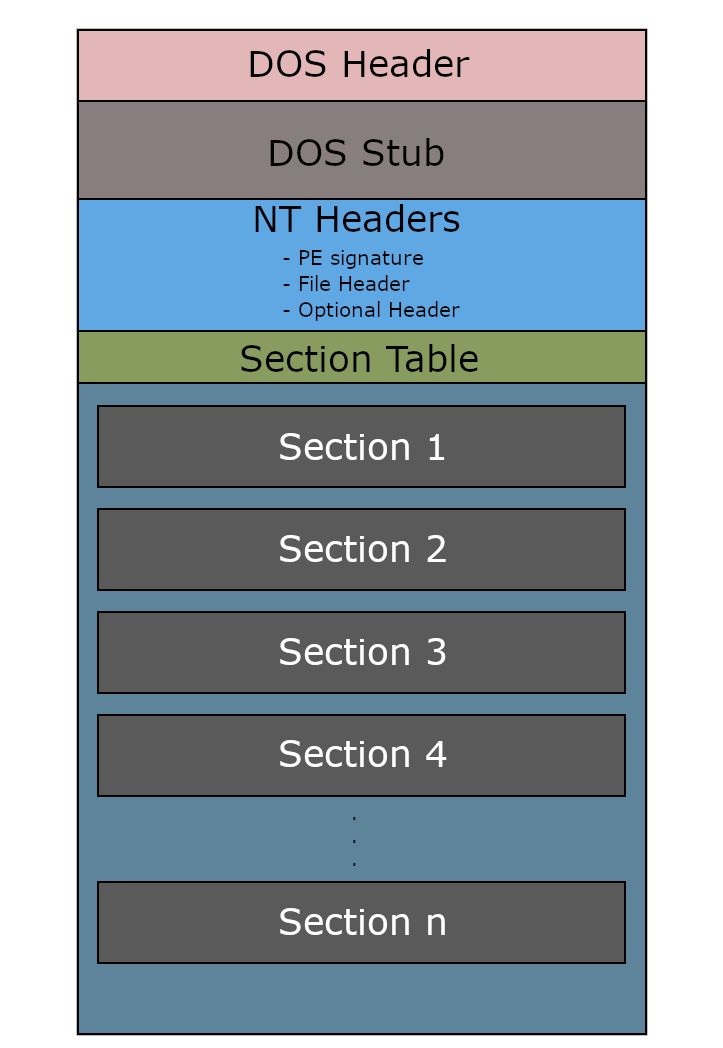
Taken from A dive into PE file format (0xRick)
From a high-level perspective, Portable Executable files are essentially, like any other equivalent binary file, a containers that hold everything Windows needs to execute a program. Think of it as a cabinet with multiple drawers, each serving a specific purpose:
The Headers act as the filing system’s index card, containing metadata about what type of executable this is, where different components are located, how much memory is needed, and what external libraries are required. These headers are like a roadmap that tells Windows how to properly load and execute the binary (This includes also the DLL loading in case of dynamic loading).
The Sections are the actual drawers containing the program’s content (executable code, initialized data, import/export information, resources, and more). Each section has specific characteristics: some are executable, others are writable, and some are read-only. Understanding this is very important !!!!
The beauty (and curse for me) of PE files lies in their flexibility. Unlike simpler executable formats, PE files support dynamic linking, resource embedding, digital signatures, and complex memory layouts that can be optimized (scrambled) for different scenarios.
Micro View
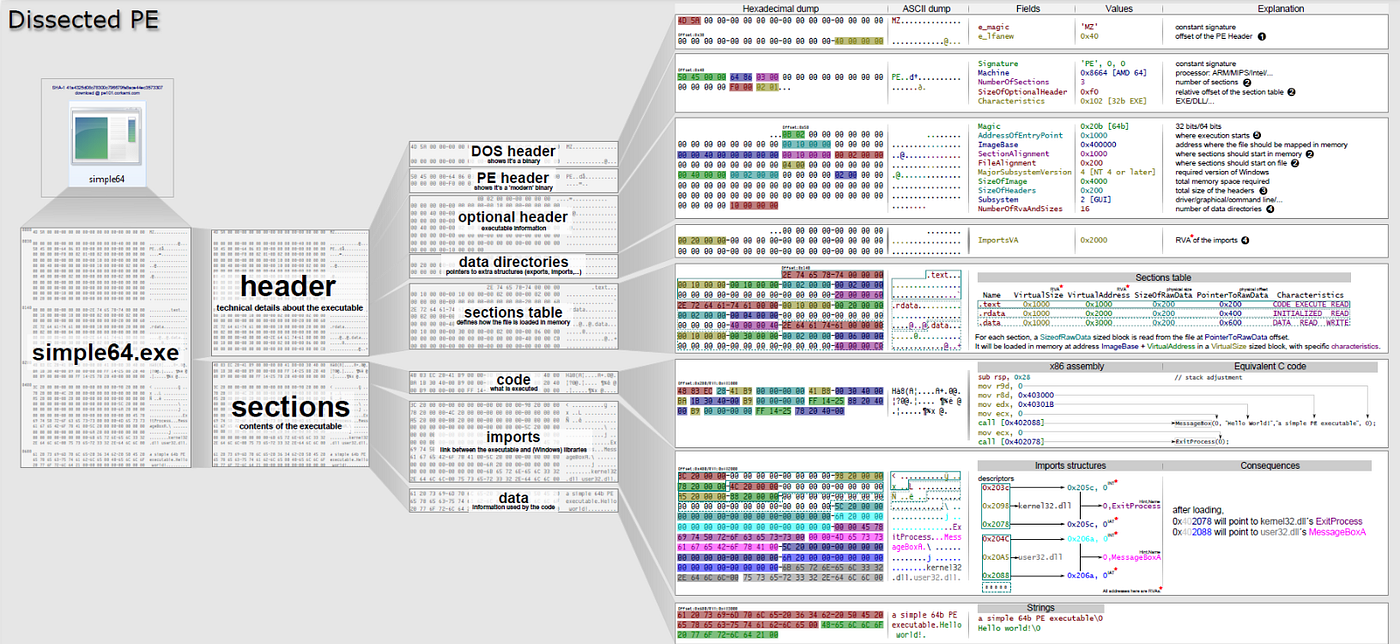
PE visualization by Ange Albertini
Now let's go one step deeper. Let’s examine the critical headers and their contents:
DOS Header (IMAGE_DOS_HEADER): This 64-byte relic exists purely for backward compatibility. Its most important field ise_lfanew, which points to the actual PE header. Everything else is essentially historical baggage from the MS-DOS era, like, why do we still have this???
DOS Stub: Sitting awkwardly between the DOS header and the real PE header is another piece of useless garbage, the DOS stub. This little "16-bit" program is what runs if some masochist tries to execute your modern PE file in actual DOS mode. Most of the time, it’s just the standard “This program cannot be run in DOS mode” message followed by a quick exit, but you never know.
PE Header (IMAGE_NT_HEADERS): This is where the real action begins. It consists of:
- PE Signature: The magic “PE\0\0” bytes that identify this as a PE file
- File Header (IMAGE_FILE_HEADER): Contains machine type, number of sections, timestamp, and crucial characteristics flags
- Optional Header (IMAGE_OPTIONAL_HEADER): This thing is called Optional, but despite its name, IT IS MANDATORY and contains the most critical information, including entry point, image base address, section alignment, file alignment, and subsystem information
Section Headers (IMAGE_SECTION_HEADER array): This is a mapping for all sections and their metadata, containing:
- Section name (8 bytes, not null-terminated)
- Virtual size and virtual address (where it lives in memory)
- Raw size and raw offset (where it lives in the file)
- Characteristics flags (executable, writable, readable, etc.)
The Binding
Here’s where things get complicated. The relationship between headers and sections isn’t just informational; I mean, they are so dependent to the point any small modification results in a full update of the whole thing. It’s a web of interdependencies that must remain consistent, or your binary becomes corrupted.
Size Consistency: The virtual size in section headers must align with the Optional Header’s SectionAlignment value. The raw size must align with FileAlignment. Miss this by even one byte, and Windows might refuse to load your binary.
Address Calculations: Virtual addresses must be calculated correctly based on the image base and previous sections. Each section’s virtual address must be aligned to SectionAlignment boundaries, and there can't be gaps or overlaps in the virtual address space.
So basically, from this prescriptive, code caves are essentially just alignment fixes.
Characteristics Synchronization: Section characteristics must match their intended use. A section marked as executable but containing only read data will trigger DEP violations.
Virtual Memory Mapping and Reference Resolution
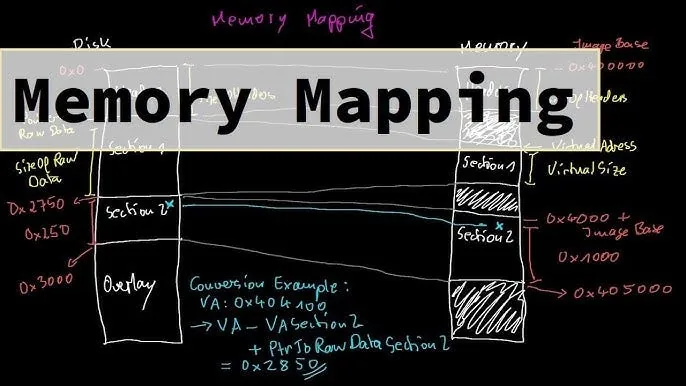
Malware Theory — Memory Mapping of PE File on Youtube
When Windows loads a PE file, it doesn’t just copy it byte-for-byte into memory. Instead, it performs a complex mapping process:
Base Address Relocation: If the binary can’t be loaded at its preferred base address (stored in the Optional Header), Windows must relocate it. This involves patching every absolute address reference using the relocation table stored in the .reloc section.
Import Address Table (IAT) Resolution: External function calls are resolved through the IAT, which gets populated at load time. The Import Directory describes which DLLs and functions are needed, and Windows patches the IAT with actual function addresses.
Section Characteristics Enforcement: Windows applies the appropriate memory protections based on section characteristics. Code sections become executable, data sections become writable, and constant sections become read-only.
Bruh Moment
After spending countless hours debugging broken PE modifications, I discovered some truly bizarre compiler behaviors that can drive you insane if you’re not aware of them.
The idata Section might randomly disappear
One of the most confusing discoveries was finding out that import data within .idata might be split across multiple sections. Modern compilers, especially when optimizing for size or performance, will split import-related data between .data and .rdata sections.
What happens: The compiler places the Import Address Table (IAT) in .data (since it needs to be writable during loading), but puts the Import Lookup Table (ILT) and import names in .rdata (since they're read-only after resolution). Later on, I understood that this optimization reduces memory fragmentation but creates hell when parsing.
Why this breaks everything: If you’re extending sections without understanding this split, you might relocate the IAT but forget about the corresponding ILT entries, leading to import resolution failures that manifest as seemingly random crashes during startup.
Also, Different compiler versions and optimization levels handle this split differently. MSVC’s behavior changed significantly between versions, and GCC’s MinGW implementation does it yet another way. There’s no reliable pattern (at least based on my tests), so you have to parse the actual Import Directory to understand how each binary organizes its import data before your modifications.
Canary What ?!

Random meme from the internet
This discovery absolutely floored me. Despite having a couple of years of experience in binary exploitation, I have never seen or heard anything related to canary complement values before.
Basically, some binaries contain not just the stack canary value, but also its bitwise complement stored in a separate location. During runtime, the program validates that these two values are indeed complements of each other as an additional integrity check.
Where it hides: These values are typically stored in the .data or .rdata sections, sometimes somewhere else, and often disguised as ordinary constants. They're referenced through indirect addressing, making them nearly impossible to identify without dynamic analysis.
Why it exists: This appears to be an undocumented anti-tampering mechanism. If an attacker corrupts memory or patches the binary incorrectly, the complement check will fail, potentially triggering silent failures or alternative execution paths?! I really don't know.
Even standard canary detection tools miss these complement values because they look for the typical \_\_security_cookie patterns. These complements use different naming conventions and are often optimized into seemingly unrelated constants \sigh\.
Thread Local Storage
Another rabbit hole involves Thread Local Storage (TLS) callbacks that execute before the main entry point. Some binaries use TLS callbacks for critical initialization, like:
Anti-debugging setup: TLS callbacks can detect debuggers before your main analysis tools even attach to the process.
Dynamic import resolution: Some binaries use TLS callbacks to manually resolve imports, bypassing the standard Import Address Table entirely, yes, they can !!!
Self-modification setup: Encrypted or packed sections might be decrypted during TLS callback execution, meaning your static analysis is examining meaningless encrypted data.
Exception Handlers

Another meme from the internet
Modern PE files can contain interesting exception handling structures that create hidden execution paths; this is similar to Signal Oriented Programming with ELF files.
Structured Exception Handling (SEH) chains: These create alternate execution flows that only activate during exceptional conditions. Meaning, modifying sections without preserving SEH integrity might cause crashes that only manifest under specific error conditions. This was another interesting finding that I might try to leverage in the future…
Vectored Exception Handlers: Registered dynamically and stored in tables that might not be obvious from static analysis. These handlers can intercept and modify program execution in ways that break assumptions about linear code flow.
The String vs Virtual Address Nightmare

Yet another meme
Here’s another nuts issue that cost me hours of debugging, some strings in .rdata look exactly like virtual addresses or better say have the same offset format. Actually, this is one of those problems that seems obvious at first but can drive you absolutely insane when you're deep in the modification process, and it is just the result of not knowing the splitting behavior of .idata .
When parsing the .rdata section for virtual address references that need patching (like when relocating sections), sometimes, you'll encounter 4-byte or 8-byte sequences that have the exact same format as valid virtual addresses. Your patching logic sees these byte patterns and thinks "aha, here's a virtual address that needs updating!" While the cute you, wonders why the string .data was updated to .daqa. So, in reality, it's just string data that happens to contain bytes that, when interpreted as integers, fall within the virtual address space of your binary.
Modern applications store all sorts of data in .rdata, configuration strings, error messages, format strings, embedded JSON/XML, and even encoded binary data. Some of this data, purely by chance, contains byte sequences that match the format of virtual addresses. The larger your binary and the more strings it contains, the more likely you are to hit this issue.
My solution to this: I had to completely restructure my parsing approach. Instead of blindly searching for address-like patterns, I did:
- Parse the original binary first to catalog all legitimate string locations in .rdata
- Extract string offsets from the string table and any other string references
- Maintain a blacklist of byte ranges that contain string data
- Cross-reference any potential address candidates against this blacklist before patching
This preprocessing step worked in most cases, but sometimes, just sometimes, we happen to have a random pointer within the range of strings, and then you will have the other way around, a not updated pointer : (
Lesson learned
Devil is within the details …
Resource Section is NOT static
The .rsrc section isn't just static data, it can contain executable resources. YES, it can! and as an example :
HTML Application (HTA) resources: These can contain JScript or VBScript that executes within the application context.
Custom resource types: Applications can define arbitrary resource types that get processed by custom handlers, creating hidden functionality that’s invisible to standard PE analysis tools.
Nothing Is Consistent
Perhaps the most frustrating aspect of PE modification is the inconsistency between different toolchains:
MSVC variations: Different Visual Studio versions produce significantly different PE layouts. The same source code compiled with VS2019 versus VS2022 can have completely different section arrangements, alignment requirements, and optimization patterns.
GCC/MinGW differences: These tools follow different conventions for section naming, alignment, and import organization. A technique that works perfectly on MSVC-compiled binaries might completely fail on GCC-compiled ones.
Optimization: Compiler optimization levels can completely restructure the binary layout. Link-time optimization, in particular, can merge sections, eliminate dead code, and reorder functions in ways that break static analysis assumptions.
Conclusion
PE file modification is a fascinating and annoying project. Every binary is a unique puzzle with its own quirks, optimizations, and hidden surprises. Modifying them does indeed give you a deep knowledge of how they work. While frustrating, this complexity is also what makes the field interesting for reverse engineers and maldevs.
Stay curious, stay persistent, and remember, if PE modification still sounds easy, then do it yourself!
Originally published on Medium.