GCP, IAM on steroids
Source: https://moabid.me/blog/gcp-iam-on-steroids/ Published: 2026-11-01 Domains: Cloud Security, Offensive Security Topics: IAM, Red Teaming, Reconnaissance, OPSEC, Privilege Escalation

Okay. I promised this one.
At the end of the last article, I basically said “I’ll go deeper per provider later,” which is the universal developer phrase for this will never happen.
It took me longer than expected. But here we are.
GCP.
Or, as my brain filed it after a few months of staring at it:
a very clean hierarchy wrapped around a very cursed set of identity transitions.
The thing about GCP is that it looks friendlier than AWS. AWS throws six policy types at you in the first thirty seconds and tells you to figure out the evaluation order yourself. GCP hands you a tidy little tree and says:
“See? Inheritance. simple.”
And it IS simpler.
Right up until a service account impersonates another service account that is attached to a workload you can modify, inside a project that inherited a binding from a folder nobody has looked at since 2021.
Clean architecture. Cursed outcomes.
Let’s go.

Everything Is a Resource (Say It With Me)
This is THE first concept in GCP, and if you skip it, the rest will never click.
In GCP, almost everything sitting somewhere in the hierarchy is a resource, and almost everything can have an IAM policy attached to it.
A project? Resource.
A bucket? Resource.
A folder? Resource.
A BigQuery dataset? Resource.
A service account?
Also a resource. (More to this comes later!)
Why does this matter offensively?
Because “who can do what” in GCP is answered at the level of a resource’s IAM policy. You don’t ask “what can Alice do” and get a clean list back. You ask “what policy is attached to this resource, and does it, or anything it inherited from above, grant Alice a role that contains the permission.”
Permissions don’t live on the identity.
They live on the binding between a principal and a resource.
That inversion is the whole game. Once “everything is a resource with a policy,” then “an identity that can set the policy on a resource” becomes an obviously terrifying capability, and “an identity that is itself a resource you can set a policy on” becomes… well, keep reading.

The Hierarchy, and Why It Lies
GCP gives you this:
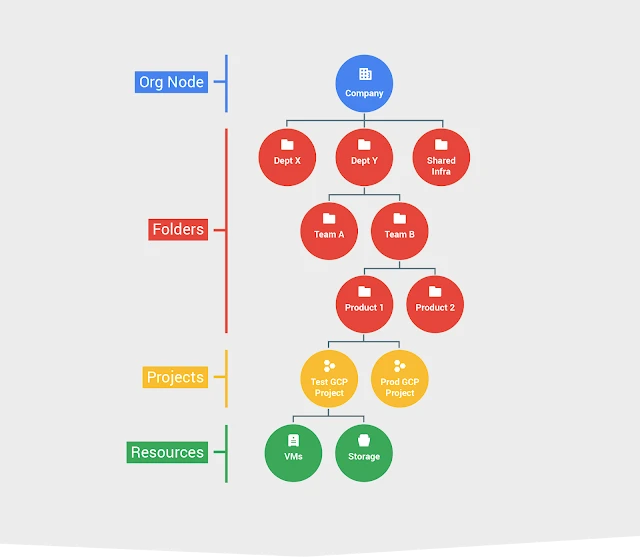
IAM bindings granted higher up inherit downward. Grant roles/viewer at the folder, and every project and resource underneath inherits it. You cannot "un-grant" it lower down by removing it. Why? Because IAM allow-bindings are additive. They only accumulate.
And thus your access is basically the UNION of all permissions piled up as you go down the tree.
And again, there is no “subtract” in the allow model.
So, when reviewing access, we therefore need to follow the ancestor chain. The resource’s local policy only shows part of the picture, and treating it as the whole thing is a very efficient way to write a confidently wrong report.
So again:
The effective access on a resource = everything attached here + everything inherited from the project + the folder(s) + the org
Now, you're probably thinking a lot of what ifs, so before you ask, let me answer you straight up.
Yes, but not in the allow policy. You subtract with Deny policies and with IAM Conditions.
In other words:
deny >> allow
IAM conditions, as the name suggests, allow you to define deny or/and allow conditions to happen and trigger based on time, resource, or request attributes…
So before you walk up into a beautiful PERMISSION_DENIED make sure you keep that in mind :)

Principals, Roles, Permissions, or better say the Hotel
Before we go deeper, you need these words when you’re reading a binding at 2 am, nothing makes sense, and you’re pretty sure someone’s keycard opens a door it shouldn’t.
The principal is the “who,” so anyone or anything moving through the building.
A user is a person on property.
Doesn’t matter who: a guest, a staff member, someone with a real face and a simply… A Google account.
A group is a booking party, aka a Google Group. Guests, staff, the hotel’s own machines or robots, all under one reservation, mixed together. And yes, parties nest. A party inside a party inside a party, and somehow the intern’s name is on the booking for the penthouse.
Uhh, this nested partying is triggering some PTSD in me :\ But let’s continue.
A serviceAccount is one of the hotel’s machines. The elevator, the laundry robot, the booking system.
No face, never types a password, just runs all day. And way more of them are carrying keycards than you’d think, thankfully ;)
A domain is the whole guest and staff directory, meaning every account in a Workspace or Cloud Identity domain. Everyone checked in under your hotel, in one line.
And principal / principalSet are guests from a partner hotel elsewhere in the chain. Aka, Federated identities. Their own hotel vouches for them, so we let them in on that. A principal is one guest, a principalSet is the whole coach tour. Most of those are basically aliens with connections, but it's fine; they do their job and go home. We’ll get to those.
Then there’s the role, the “what.”
Think of it as a keycard profile.
Three flavors.
Basic roles, so Owner, Editor, Viewer. The old master keys, or better say relics from the past. They should’ve been retired and sold years ago, some are keeping them in a drawer as a legacy, i mean souvenir but it is over we have to move on.
Even Google’s own docs warn you off them. Why? First of all because of the zero trust mentally and second of all because of how easily they can be abused. Editor to Owner is in most scenario easily achievable.
Predefined roles. The chain programmed these profiles for you, one set per service. roles/storage.objectAdmin And friends.
Custom roles. You program the keycard yourself and pick exactly which doors it opens.
And under all of that is the permission: a single door. It looks like service.resource.verb.
For example,storage.objects.get opens one storeroom so you can see what’s inside. iam.serviceAccounts.getAccessToken lets you clone a machine’s keycard and go around as that machine. Maybe you want to do laundry yourself that day, idk? But keep that one in mind.
A role is just a keycard profile with a bunch of these doors on it.
And that’s pretty much it. A principal gets a role on a resource. Someone (or something) gets a keycard for a part of the building, and the keycard is a bunch of doors. One binding can hand the same keycard to a whole mix at once, a guest, a couple of machines, a booking party. The rest is detail.

Two not One!!!
This is the single most common misconception I run into. It is crazy how many people in the industry misunderstand GCP policies.
GCP has IAM Policies.
GCP also has Organization Policies.
These are NOT the same thing.
They don’t answer the same question. They don’t evaluate the same thing. They don’t even fire at the same time.
And people merge them into one blurry “policy” concept and then write reports that are wrong in both directions.
IAM Policy answers: who can do what to which resource.
It governs identity authorization.
What it evaluates is basically the actor.
e.g: “Can user@domain.com launch this instance?"
They are built from roles (our bags of permissions) bound to principals.
Their inheritance is strictly additive, like we mentioned earlier.
They are triggered dynamically, meaning on EVERY SINGLE API request, in other words, at runtime.
Example: give the DevOps team roles/storage.objectAdmin on one bucket, or take over a DevOps engineer identity and use it to trick Binance’s own hot-wallet signing infrastructure into signing $6.3B transfers :))))
Organization Policy answers: what resources are even allowed to be.
It governs guardrails on resources. And doesn’t really care who’s asking.
What it evaluates is more or less the resource’s properties.
e.g: “Are Compute instances in this project allowed to have a public IP at all?”
They are built from constraints. Either list constraints (allow/deny specific values, like permitted regions) or boolean constraints (turn a behavior on/off, like disabling SA key creation).
Their Inheritance is not additive like the others but rather hierarchical with override.
Meaning children inherit by default, but lower nodes can override or merge unless an admin locks it.
They are triggered at the control plane when a resource is created or modified, and their use case is basically creating a point to stop non-compliant infra from ever existing.
Example: constraints/gcp.resourceLocations locking all creation to europe-west3 / europe-west1.
The short version:
IAM        = runtime, per request, about the ACTOR
Org Policy = control plane, at create/modify time, about the RESOURCE
Now you might be asking, but why should I care? I can just prompt my way thro, no?
Well …

Your IAM path can be perfectly authorized and still drab rassek (hit your head) into an Org Policy at create-time.
You’ve got compute.instances.create and actAs on a juicy SA.
Beautiful.
Then constraints/iam.disableServiceAccountKeyCreation or an external-IP restriction quietly rewrites what you can actually do with it.
Most Orga policies violations are logged and heavily monitored, so this rookie mistake might be the end of your engagement.

Service Account, or The Hybrid
Okay. The best part.
Our lil robot, alien, or a Hybrid, called a service account, is two things at once.
SA as a RESOURCE                                        SA as an IDENTITY
(stuff done TO it)                                       (stuff it DOES)
Another principal ── role ON the SA──▶   SA   ──acts AS──▶  Resource
When the SA is an identity, it’s the one doing things.
When you see a VM grabbing a token, reading a bucket.
It is not the VM; it is the SA. The SA did that.
How do you know that?
Easy. It shows up on the member side of a binding somewhere: serviceAccount:svc@proj.iam.gserviceaccount.com.
It holds roles. It impersonates another SA and borrows that identity for the life of a short-lived token.
Now, when the SA is a resource, it’s the thing being acted on.
Someone sets an IAM policy ON the SA. As in: “who is allowed to become this SA.”
Grant roles/iam.serviceAccountTokenCreator on a SA to principal X, and X can now mint tokens as that SA. That role is bound on the SA-as-resource.
iam.serviceAccounts.actAs. iam.serviceAccounts.getAccessToken. iam.serviceAccounts.getIamPolicy. All of these are permissions against the SA as a resource.
So every SA in your graph needs TWO kinds of edges.
What can this SA reach? (identity → resources)
And who can become this SA? (principals → SA-as-resource)
That second edge is where privesc “might” hide. Why I said might is because these are some of the most noisy permissions out there, with many detections and alarms around them. But hey, remember, OPSEC is about knowing what the fuck you are doing, not how noisy this might be!
So to keep in mind, SA gets attached to workloads based on whether the caller has actAs on it. Not based on some trust policy on the SA naming the caller like AWS role trust.
Next to come are its flavors.
We have User-managed SAs. These you made.
And Default SAs.
Google auto-creates them. The Compute Engine default SA is the famous one. These are the over-permissioned ones, and the ones most likely to be bolted onto a workload you can already touch.
And native impersonation hands you short-lived tokens with no key to download. This is both the secure way to use SAs and a very convenient way to move without leaving a static credential lying around.

Foreign Workloads: Workload Identity Federation, and Why It Exists
Principals aren’t just Google accounts and SAs. GCP also takes external identities through Workload Identity Federation. That’s where principal / principalSet come from.
So why does this exist?
Because the alternative is service account keys.
And SA keys are a disaster.
A SA key is a long-lived JSON blob of static credentials. Developers download it, paste it into CI, commit it “temporarily,” email it to themselves, and store it in prod_sa_key_FINAL_v2_real_no_cap.json.
They don’t rotate. They don’t expire. They leak constantly.
Leaked SA keys are one of the most reliable ways a GCP environment gets owned.
Workload Identity Federation kills the key.
Instead of keys, an external workload (a GitHub Actions run, a GitLab job, an AWS role, an Azure workload, an on-prem OIDC/SAML identity, a Kubernetes SA …) shows up with its OWN native token.
GCP checks that token against a workload identity pool and provider, applies an attribute mapping and condition, and hands back short-lived GCP credentials. Optionally impersonating a SA.
Now the offensive bit.
That trust config is an edge in your graph. And it’s constantly misconfigured.
The classic screw-up is a lazy attribute condition. A very basic example is a provider that accepts “any GitHub repo,” or “any subject from this issuer,” instead of pinning the exact repo, branch, or org.
If that condition is too loose, an external identity you can just… get… (your own GitHub repo, your own AWS account) becomes a principal that can impersonate a GCP SA.
The boundary moved outside Google, and whoever wrote the mapping probably didn’t realize they were writing an authorization rule.
So on any GCP engagement: enumerate the pools and providers, read the attribute mappings, and ask Question 3 from my latest articles: can I reach another identity from mine?
Except “mine” might start in a completely different cloud.

Discovery? Know This First
Before you touch anything, a few GCP realities that decide how loud every move is.
First, Enumerating permissions is sideways, not direct.
GCP won’t hand you “list this identity’s permissions.” You work it backwards. Ask what permissions YOU have on a specific resource (testIamPermissions). Read a resource's IAM policy (getIamPolicy). Or, if you're lucky, use Cloud Asset Inventory.
Cloud Asset Inventory is the cheat code.
But first, understand something important about GCP.
There are two main ways of getting information about resources in GCP.
Directly through the service itself, or indirectly through Cloud Asset Inventory.
The direct way
Every GCP service exposes its own API.
Want to know what VMs exist? Talk to the Compute Engine API.
Want to know what buckets exist? Talk to the Cloud Storage API.
Want to enumerate Cloud SQL instances? Talk to the Cloud SQL Admin API.
Simple.
But here’s the catch: each service has its own permissions.
To list VMs through Compute Engine, you generally need compute.instances.list.
To list buckets through Cloud Storage, you need storage.buckets.list.
Having permission to enumerate one service doesn’t automatically mean you can enumerate another.
You’re talking directly to the service, so the service checks whether you’re allowed to ask for that information.
The indirect way
Instead of talking to each individual service, you talk to one central service: Cloud Asset Inventory (CAI).
Think of it as Google’s centralized inventory of your cloud environment.
It collects and indexes information about supported GCP resources, their configurations, and their IAM policies.
So rather than querying Compute Engine, Cloud Storage, Cloud SQL, and everything else separately, you ask CAI what resources it knows about within a project, folder, or organization.
And here’s where it gets interesting.
You don’t necessarily need the original service’s read permissions anymore.
An identity might NOT have compute.instances.list, meaning it cannot enumerate VMs directly through the Compute Engine API.
But if that same identity has cloudasset.assets.searchAllResources at the right scope, it may still be able to discover those VMs through Cloud Asset Inventory.
Same resources. Different API. Different permission check.
That’s the trick.
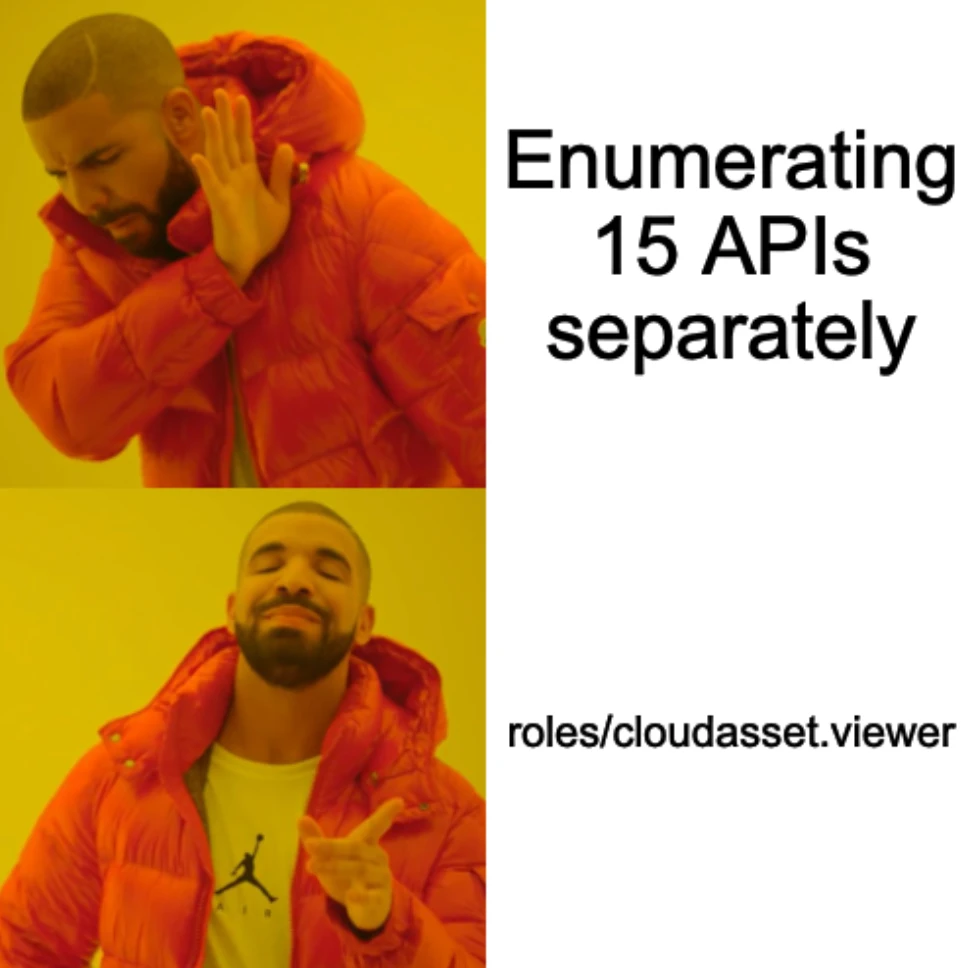
And that’s exactly why roles/cloudasset.viewer is so valuable for discovery.
It lets you search resource metadata and IAM policies across the scope where the role is granted, without requiring separate viewer permissions on every underlying service.
Project-level grant? Broad visibility into supported assets in that project.
Organization-level grant? Potentially visibility across the organization’s supported assets.
One permission set. Multiple services. A lot of information.
Now, an important distinction.
Cloud Asset Inventory is NOT an IAM bypass. You’re not bypassing Compute Engine permissions. You’re using a different, explicitly authorized API that exposes indexed information about Compute Engine resources.
And don’t confuse seeing a resource with having access to it.
CAI might tell you a VM exists, what project it’s in, and some of its configuration metadata. That doesn’t mean you can SSH into it or read what’s on its disk.
Also, CAI isn’t a perfect live mirror. Its inventory is eventually consistent, and not every resource type or metadata field is supported.
Still, for discovery? Extremely useful.
roles/cloudasset.viewer lets you pull supported resource metadata and IAM policies across a project or organization, depending on where the role is granted, without needing per-service viewer roles. Some operations have additional permission requirements, such as serviceusage.services.use.
If a developer SA or a scanning tool (Wiz and friends) has cloudasset.viewer ... Yeah that's some juicy discovery ...
Check for it early.
Logging defaults decide your blast radius.
Admin Activity logs are ALWAYS on. You cannot turn them off. Every control-plane change is recorded. Full stop.
Data Access logs are OFF by default for most services (BigQuery being the historical exception).
What does this mean for us?
A lot of read enumeration lands in exactly that Data Access category. Which means in a default config it can leave no audit trail at all.
Until someone flips it on.
And here’s another reason the direct vs. indirect distinction matters: logging follows the API you’re actually calling.
If you’re enumerating VMs directly through the Compute Engine API, the relevant audit logging is associated with compute.googleapis.com.
If you’re enumerating those same VMs indirectly through Cloud Asset Inventory, you’re calling cloudasset.googleapis.com.
Different service. Different API methods. Different logging configuration to check.
Admin Activity / System Event logs sit in the _Required bucket with 400-day retention.
Data Access logs usually go to _Default, where the default retention is 30 days, unless configured otherwise.
One more point to keep in mind, even in big orgas, never assume that every enumeration operation is automatically covered. It really depends on the service, API method, audit configuration, and possible exemptions.
And remember, no Cloud Audit Log entry doesn’t necessarily mean no evidence anywhere. Other telemetry might exist.
Keep this in mind. Never assume. Always Verify.
Offline vs online discovery.
On a VM you don’t need the API to learn a lot. Hit the Instance Metadata Server:
http://metadata.google.internal/computeMetadata/v1/...
Metadata-Flavor: Google
Read the attached SA, its scopes, pull a token. Quiet-ish recon that doesn’t touch the control plane (The API shit)
But understand the difference: the metadata server tells you about the VM you’re running on and its local cloud identity context. It doesn’t give you a complete inventory of the entire project.
And obviously, like I explained earlier, getting an access token doesn’t magically tell you every permission the service account has. The token is a credential. Actual API access still depends on the applicable OAuth scopes and IAM permissions.
Also, the moment you start using that token to query Compute Engine, Cloud Asset Inventory, or other Google Cloud APIs, you’re back to online discovery and the logging behavior of whichever API you’re calling.
The golden rule is to always start low cost and build up that karma along the way thro your risk management matrix.
OPSEC "Safe" Enumeration?
Same OPSEC philosophy as last time. “Safe” is not “invisible.” It means I know what this touches and what it logs.
With this limitation:
testIamPermissions is the your friend, buddy, fella, whatever you wanna call it. It tells you which of a set of permissions YOU hold on a resource. Cheap.
But spray it, and it’s a flare.
So, use it carefully against a couple of high-value permissions, and you are good to go!
Do I have cloudasset.viewer? Do I have actAs on THIS SA?
It answers real questions quietly. But use your brain before you use it, please!
iam.serviceAccounts.getIamPolicy (basically reading who-can-impersonate on an SA) is loud for a SOC that's watching IAM telemetry.
I wont say dont use it tho, your risk and OSINT will. Decide based on scenario!
IMDS on VM-based stuff is your quietest surface for the local identity. No control-plane call to read your own attached SA and token.
And roles/cloudasset.viewerif you already have it, it's basically free enumeration. First thing to check.
Rule stays the same.
The question comes before the API call.
If policy analysis or an IMDS read answers it, don’t go poke the loud API just to feel productive.
Interesting Findings
Scopes >>> IAM roles
On GCE, a VM’s SA can hold strong roles, but access scopes on the instance can cap what the token is actually allowed to do. And sometimes broad scopes surprise you the other way. When you pull a token off IMDS, check the scopes, not just the roles. They don’t always agree.
Next point goes more towards IaC.
Terraform, for example, doesn’t necessarily own every IAM binding on a resource.
It just depends on how it’s configured.
For example:
google_project_iam_policy
    → Entire IAM policy is authoritative
google_project_iam_binding
→ One role's members are authoritativegoogle_project_iam_member
→ One membership, non-authoritativeWhat does this mean for us? Easy, Terraform might manage specific bindings while other bindings exist outside those resources.
And if nobody is checking actual IAM state against intended configuration, those differences can survive long enough to reach production.
Obviously, not every difference is a vulnerability.
But unexpected permissions that remain outside IaC controls are worth checking ;-) You never know …
Now going straight into my biggest finding. And it is exactly where editor Quietly became owner.
Let me explain how this USED to work, why it was such a big deal, and why a lot of the old GCP privesc techniques don’t work the same way anymore.
Because if you’ve been reading older GCP exploitation research, you’ve probably seen something like this:
Get Editor. Abuse a Google Cloud service. End up with Owner.
Sadly, life isn’t that easy anymore.
But still, historically, and under the right conditions, it was really that straightforward.
The interesting part wasn’t Editor magically becoming Owner.
It was getting a more privileged service account to perform actions on your behalf.

First, why was Editor so dangerous?
GCP’s original basic roles were Viewer, Editor, and Owner.
Editor was everywhere.
Developers had it. Automation had it. Default service accounts had it.
And historically, newly created Compute Engine and App Engine default SAs were automatically granted roles/editor on their projects.
The problem?
Editor could create and modify a huge number of resources across different GCP services.
But it did NOT contain resourcemanager.projects.setIamPolicy.
Meaning you couldn’t simply assign yourself roles/owner through the project's IAM policy.
So how did people escalate?
They went through services that executed operations as another identity.
And those services didn’t always enforce the same service-account attachment checks they enforce today.
Just imagine this with today’s level of AI tooling. It would have been a GGs from all aspects.
Anyhow, let’s take an example, see how it was abused before, what changed now, and how does this type of escalations look like today.
cloudbuild.builds.create
This was one of the classic examples.
How it worked before:
Cloud Build traditionally executed builds using a Google-managed legacy service account:
PROJECT_NUMBER@cloudbuild.gserviceaccount.com
That service account was granted roles/cloudbuild.builds.builder.
And that role contained a fairly broad set of permissions.
Now imagine you’re a developer with roles/editor.
You have cloudbuild.builds.create.
You submit a build.
Cloud Build executes the build steps using its legacy service account, not your personal identity.
And here’s the interesting part:
You didn’t need iam.serviceAccounts.actAs on the legacy Cloud Build service account.
So someone who could create builds could cause operations to execute using the permissions of that build identity.
If that identity had access the caller didn’t, there was a potential privilege-escalation path.
Google’s own documentation still explicitly warns about this.
And the older Tenable ConfusedFunction research demonstrated a related problem involving Cloud Functions and Cloud Build.
But why does the old technique not work the same way anymore?
In May-June 2024, Google changed Cloud Build’s default service account behavior.
Before, it was something along the lines of:
Developer with builds.create
        ↓
Submit Cloud Build job
        ↓
Legacy Cloud Build SA
        ↓
Broad build-time permissions
        ↓
Potential privilege escalation
Now, for projects using the newer defaults:
Developer with builds.create
        ↓
Submit Cloud Build job
        ↓
Compute Engine default SA
        ↓
iam.serviceAccounts.actAs check
        ↓
Only proceeds if authorized
The important change is the identity AND the authorization check.
In the new model, a caller submitting a build using the Compute Engine default SA or a user-specified SA generally needs iam.serviceAccounts.actAs on that identity.
And since May 2024, newer organizations also prevent automatic Editor grants to default Compute Engine service accounts.
Which means, this old assumption will not work anymore
Or does it?
Older projects that used Cloud Build before the 2024 change can still use the legacy SA.
Organizations can also configure policies that allow the legacy identity.
And modern Cloud Build environments can still have overprivileged user-managed build SAs.
You know what they say. Legacy lives and security dies.
Yes, no one said that. That was just me : ) Anyways, let’s continue.
Build triggers are another interesting case.
Someone might not have direct permission to use the build SA, but might control source code consumed by a trigger.
If that code executes in the pipeline, the build still runs under the configured execution identity.
Different entry point. Yet, the same underlying trust-boundary problem.
So to keep it short.

The modern question isn’t just whether you have cloudbuild.builds.create
It’s:
What account does the build actually use?
Does the caller need actAs?
Who controls the build configuration or source code?
And what permissions does the build SA hold?
That’s what determines whether the old risk still exists.
The same idea was also abused throughdeploymentmanager.deployments.create, or the Default Compute Engine SA, which was used literally everywhere.
I wanted to explain the change in these as well, but the article is already too long, and we are still not finished. So do what you should do best and do your own research!
Now you should be asking. What about today?
So, to summarize.
Editor was never equivalent to Owner.
The old escalation wasn’t simply:
roles/editor
    ↓
roles/owner
It was closer to:
roles/editor
    ↓
Ability to control a service or workload
    ↓
Execution as another identity
    ↓
That identity has additional permissions
    ↓
Potential privilege escalation
And even then, gaining project Owner specifically required an identity or mechanism capable of changing the relevant project IAM policy.
That’s the piece a lot of old research skips.
So what changed?
Google tightened several defaults.
Default SAs stopped automatically getting Editor in new organizations.
Cloud Build changed which default SA it uses.
More deployment workflows require explicit iam.serviceAccounts.actAs.
Organization policies can restrict privileged service-account grants.
Deployment Manager is being retired.
But none of that eliminates the general problem.
It just means the easy, default configurations that historically enabled many escalation chains are less common.
This means the modern equivalent isn’t necessarily one magic permission, but rather a combination of permissions and a privileged execution identity. Like how security has always been.
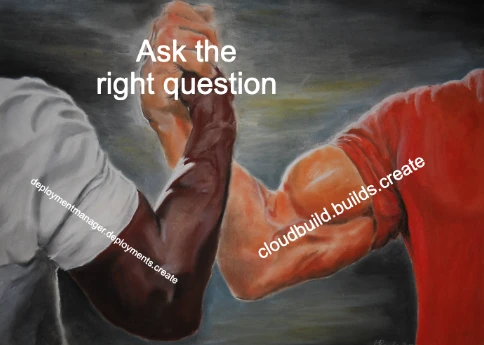
Now it is more important than ever to ask the right questions within the right context.
Cloud Build and build triggers.
Who can submit builds, alter build definitions, update source repositories, or invoke triggers? What SA executes them?
Infrastructure Manager and Terraform pipelines.
Who can control the Terraform configuration? Which SA runs the deployment? Can it modify IAM policies or other sensitive resources?
Cloud Run and Cloud Functions.
Who can deploy or update workload code? Which runtime identity is attached? Do the relevant actAs checks prevent unauthorized use of privileged identities?
Compute Engine, GKE, and Composer.
Who can create or modify workloads? What identity do those workloads run under? What permissions are attached to the VM, node, or workload identity?
Service account impersonation.
Does someone have iam.serviceAccounts.actAs, or do they have iam.serviceAccounts.getAccessToken through Token Creator or another applicable role?
These are different capabilities.
actAs generally permits using a service account with supported resources when the caller also has the relevant deployment permissions.
getAccessToken permits direct OAuth token generation, subject to the applicable controls.
Don’t mix them up.
Back to the Seven Questions
Same seven questions as last time. GCP just swaps the implementation.
1. Who am I?               -> user / SA / federated principal? IMDS tells you. Check scopes too.
2. What can I reach?       -> cloudasset.viewer? getIamPolicy? resolve the WHOLE ancestry, not one resource.
3. Reach another ID?       -> impersonation (tokenCreator), actAs, workload-run-as, federation edges.
4. Change the graph?       -> setIamPolicy on a resource / SA, bindings, org policy you can edit.
5. Durable access?         -> SA keys (if not disabled), new bindings, federation configs that outlive you.
6. Cross a boundary?       -> folder / project / org inheritance, shared SAs, cross-project actAs.
7. What will defender see?  -> Admin Activity = always logged. Data Access = maybe not. Model it BEFORE the call.
The commands rot. The gcloud flags change. Deployment Manager literally died while I was writing this.
The questions don’t move.

Conclusion
GCP’s superpower is the hierarchy.
Its curse is that the hierarchy makes every resource lie to you when you look at it alone. Because the real answer lives in its ancestry, its Deny policies, its conditions, and the identities that can become other identities.
Everything is a resource.
The identities are resources.
The service accounts are resources AND principals.
And the biggest lesson?
Privilege escalation was never about one magic permission.
Editor, cloudbuild.builds.create, actAs, tokenCreator, "deploy."
Because they don’t do damage themselves.
They borrow an identity that does.
Last but not least.
The commands change. The defaults change. The old tricks die.
The seven questions don’t.
Next one’s AWS.
Thanks for reading and Happy hacking ~
References
- Google Cloud. “Deployment Manager deprecation / end of support.” Cloud Deployment Manager Documentation. https://cloud.google.com/deployment-manager/docs/support
- Google Cloud. “Cloud Build service account changes.” Cloud Build Documentation. https://cloud.google.com/build/docs/cloud-build-service-account-updates
- Google Cloud. “Introduction to service identity” (default SA / iam.automaticIamGrantsForDefaultServiceAccounts). Cloud Run Documentation. https://cloud.google.com/run/docs/securing/service-identity
- Tenable Research. “ConfusedFunction: privilege escalation via the Cloud Build service account.” https://www.tenable.com/blog (search “ConfusedFunction Cloud Build”)
- Google Cloud. “About resource hierarchy.” Resource Manager Documentation. https://cloud.google.com/resource-manager/docs/cloud-platform-resource-hierarchy
- Google Cloud. “Service account impersonation.” IAM Documentation. https://cloud.google.com/iam/docs/service-account-impersonation
- Google Cloud. “Workload Identity Federation.” IAM Documentation. https://cloud.google.com/iam/docs/workload-identity-federation
- Google Cloud. “Organization Policy Service / constraints.” Resource Manager Documentation. https://cloud.google.com/resource-manager/docs/organization-policy/overview
- Google Cloud. “Cloud Audit Logs overview.” Cloud Logging Documentation. https://cloud.google.com/logging/docs/audit
Originally published on Medium.