Do you speak ELF?
Source: https://moabid.me/blog/do-you-speak-elf/ Published: 2023-10-25 Domains: Systems Programming, Offensive Security Topics: Binary Formats, Reverse Engineering Languages: C
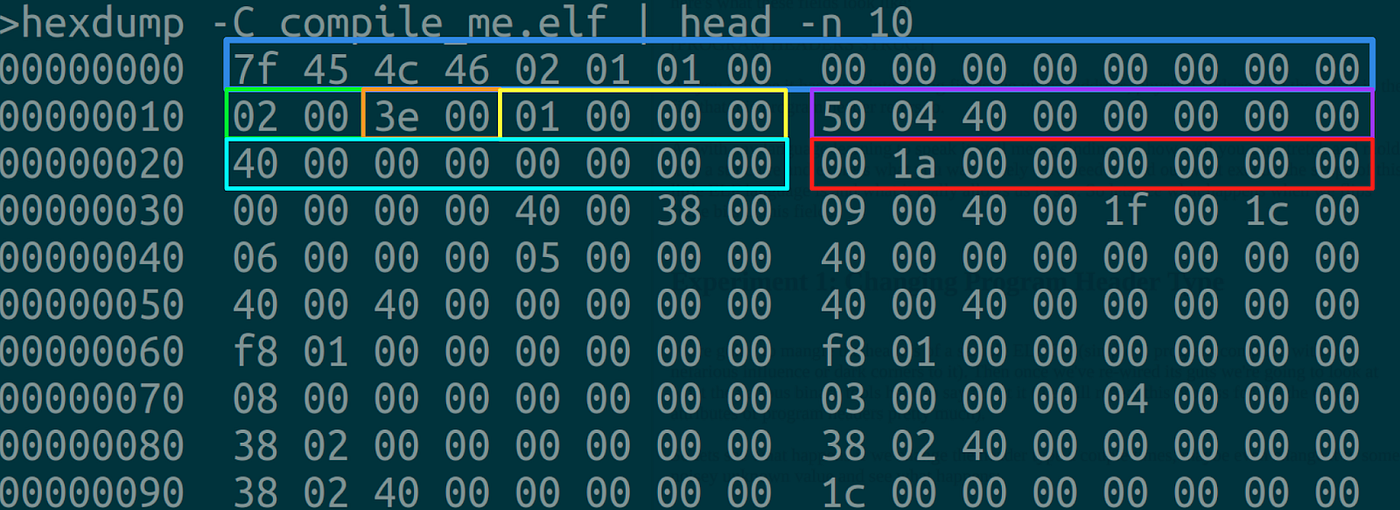
Ahoy, folks! Welcome to the mystical land of Linux Kernel, where the quest for the holy grail, also known as the ‘one piece’ 🤠, is reserved for only the bravest out there, yee-haw! But hold your horses, ’cause in this wild universe, we’re diving deep into the realm of ELF. Nope, not the magical creatures 🧝, but the ELF file format, the fancy schmancy standard for running things in the Linux world. So saddle up, ’cause today, we’re playing Kernel, trying to manually make this ELF file go vroom-vroom!

Agenda :
- ELF Architecture
- Processing ELF binaries
a. Preparation phase. b. Stack Population phase.
- Start? What’s next
- Summary
ELF Architecture
Let’s get the technical specs straight. The ELF format is like that one friend who’s super chill, not tied down to any specific group or clique — doesn’t care if you’re ARM, x86_64, 32-bit, or 64-bit. It’s a format with no biases. Once it’s compiled, it’s all about that CPU architecture life — no time for mingling with other architectures, very loyal indeed. Now, the real star of the show is its anatomy. Let’s dive into that banner once more, shall we?
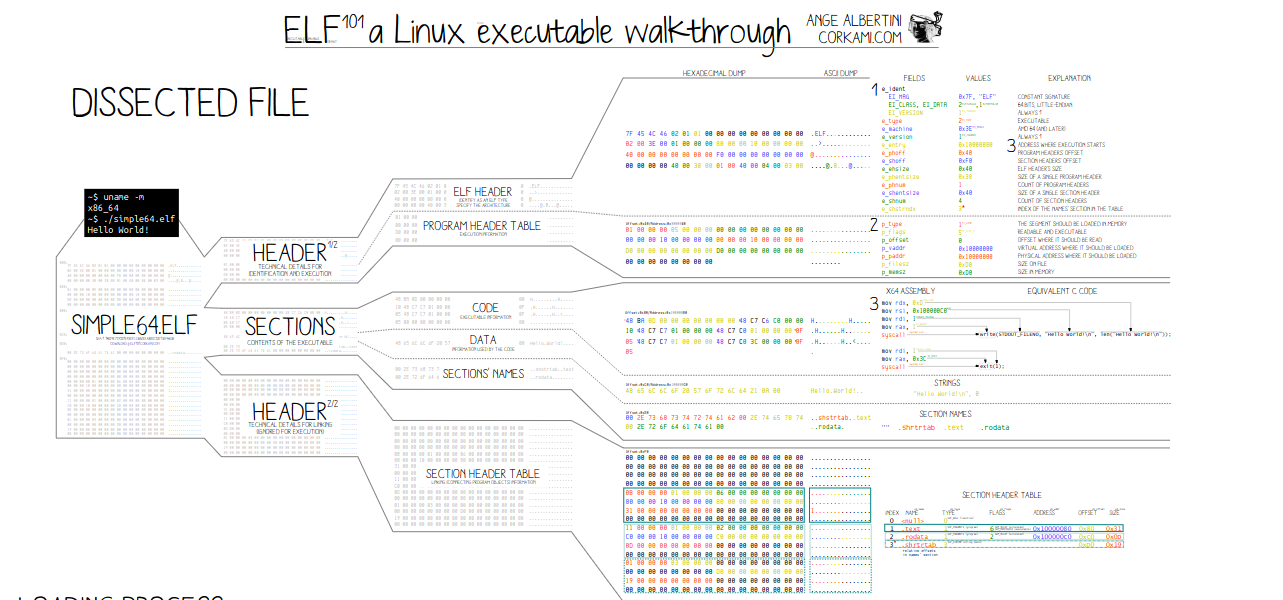
Take this little 64-bit binary on an x86_64 architecture as an example. When we crack it open, we find it’s made up of three crucial components, the ELF Header, the Sections, and the Segments. Each of these has its own gig in the grand linking/loading show of the ELF lifecycle.
- The header :
- It’s like the file’s signature, proudly waving the binary metadata flag with details about the architecture, version, entry point, and more.
- Holds the binary metadata, like the architecture, the version, entry point, different offsets, and more …
- Think of it as the ID card for the binary but with a lot more secrets tucked inside.
readelf -h your_binary. The Sections:
- These contain the deets necessary for linking the target object file to make that sweet, sweet executable.
- Remember, these are the heroes of the link time, but they slink into the shadows at runtime.
- And don’t forget the Section Header Table, a sort of directory for all the important stuff.
readelf -s your_binary. Segments :
- These are the ones you need for the runtime show, not so much for the linking party.
- They hold all the crucial binary intel, sliced and diced into chunks, like the .text that’s got all that juicy binary code.
- Think of them as the stagehands making sure everything runs smoothly behind the scenes.
readelf -S your_binaryProcessing ELF binaries
All the processing of ELF binaries is done by the Kernel, and thro this section I will try to explain and provide links to the source code for reference. If you are reading this, I assume you are already familiar with the kernel source code, if not this is your chance, get yourself comfortable reading the Kernel source code (Every explained later can be allocated starting from fs/binfmt_elf.c in the Linux source code). The starting point is exactly load_elf_binary().
The Kernel is responsible for all the intricacies involved in handling ELF binaries. In this section, I aim to elucidate this process and offer references to the source code. If you’re perusing this, I assume you possess some familiarity with the kernel source code. If not, consider this an opportunity to delve into the rich world of the Kernel source code. You can begin exploring from fs/binfmt_elf.c in the Linux source code, and in today’s journey we commence precisely from the function load_elf_binary().
Again diving into the kernel source code should become a habit, especially if you are keen on unraveling the inner workings of the system.
Preparation phase:
Note: Just to be clear, thro these explanation I am assuming we have a statically compiled binary.
- Processing Program Header Entries:
Focuses on three critical aspects:
- PT_LOAD Segment: Determines the location where the program runs in memory.
- PT_INTEREP Entry: Identifies the runtime linker.
- PT_GNU_STACK Entry: If present, it indicates whether the program’s stack should be executable.
2. Flushing the Old kernel State:
- The process of setting up the new program starts with a call to flush_old_exec(), which clears upstate in the kernel that refers to the previous program.
- Any other threads of the old program are killed so the new program starts with a single thread.
- The signal-handling information for the process is unshared so that it can be safely altered later.
- Any pending POSIX timers for the old program are cleared, and the location of the executable file for the program (visible at /proc/pid/exe) is updated.
- The virtual memory mappings for the old program are released, which also kills any pending asynchronous I/O operations and frees any uprobes.
- Finally, the personality of the process is updated to remove any features that could affect security, as previously recorded in the per_clear field in linux_binprm.
3. Updating the new State:
- A corresponding call to setup_new_exec() now sets up the kernel’s internal state for the new program.
- Check if the new program can generate a core dump (or have ptrace() attached to it).
- A call to \_\_set_task_comm() sets the current task’s comm field to the base-name of the originally invoked filename and also the thread name.
- A call to flush_signal_handlers() sets up the signal handlers for the new program.
- Finally, a call to do_close_on_exec() closes all of the old program’s file descriptors that have the O_CLOEXEC flag set.
4. Memory Setup :
- The highest address for the stack is typically moved downward by a random offset (A typical protection against stack buffer overflow).
- Setting up the kernel’s memory tracking structures, and adjusting for the new location of the stack, after a call to setup_arg_pages().
- Looping through all of the PT_LOAD segments in the program file and mapping them into the process’s address space.
- Setting up zero-filled pages that correspond to the program’s BSS segment.
5\. Installing the binary credentials:
- A setup via a call to install_exec_creds().
- This function lets any active Linux Security Module (LSM) know about the change in credentials.
Stack Populating
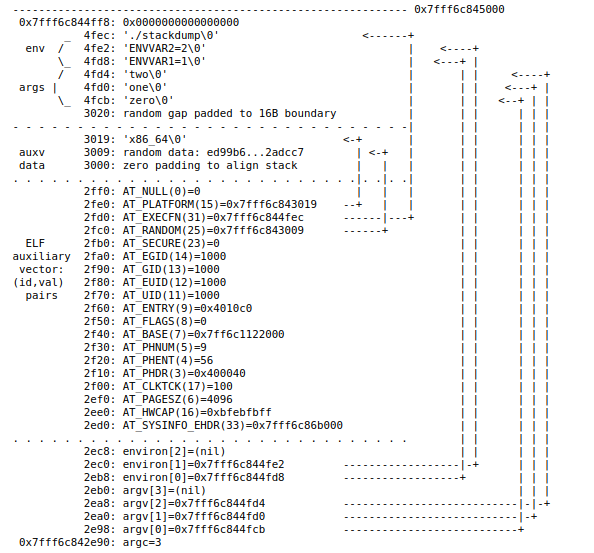
- Adding more information to the new program’s stack, when calling create_elf_tables() .
- A call to arch_align_stack() rounds down the existing stack position to a specific binary boundary.
- Creating the auxiliary vector (won’t be discussed here, but you are interested you can find a fine explanation here).
- Calculating the space, and then inserting the entries from low addresses to higher ones:
a. Inserting the argc first. b. Inserting the argv. c. Inserting the environ (environment variable). d. Inserting the auxiliary vector just after.
For further clarity, check the picture below :
Start? What’s next
When dealing with a statically linked ELF binary that does not involve any dynamic loading, the ELF interpreter isn’t required during the execution process. Instead, the operating system’s loader directly starts the execution of the program which eventually means passing control to the entry point specified by the AT_ENTRY .
Summary
Every program that runs on a Linux system passes through the portal of execve(); as such it’s a key piece of kernel functionality that’s worth understanding in detail. ELF is a complicated format, but fortunately, the kernel can ignore most of that complexity — it only needs to understand just enough ELF to load segments into memory, and to invoke a user space run-time linker program to finish the job of assembling a complete running program. Okay Folks! Last but not least, I just wanna thank you for reading and sticking around til the end ❤️
Reference
- Linux Kernel
- ELF Anatomy (also architecture of all knows formats).
- Interesting Article about how to run any binary.
- UNIX Specifications
- Another good article and more elaborated regarding the dynamic linking.
- Excellent summary of Attributes
- Auxiliary vector
Originally published on Medium.