Did someone say Memory?
Source: https://moabid.me/blog/did-someone-say-memory/ Published: 2023-04-03 Domains: Systems Programming Topics: Memory Management Languages: C
Did someone mention memory 🧐 ? I got you, don’t worry.
With this article, I will try to tackle an important concept in computer science in general. This topic can be found in multiple subjects, but the core of it is the same. So with that being said, how exactly does the memory work?
I will try to explain how it works on an abstract level. I mean by that, I am not gonna open a memory chip and explain how the circuits there work and so on, but I will open the execution of a program running some kinda memory management mechanisms and try to understand, how does it work from this perspective. To demonstrate some examples, I will use C code. (Ofc, I am gonna use C, if I use assembly probably you are gonna stop reading the moment you see an instruction 😩 but yeah even assembly isn’t that scary, it’s hard yeah but it has its use cases, and we will tackle, how to get started and learn assembly in an upcoming article).
So, sooo, soooooooooo, first we have to know that C is a high-level language with close-to-the-metal features that make it seem, at times, more like a portable assembly language than a sibling of Java or Python. Among these features is memory management (or better say the main key), which covers an executing program’s safe and efficient use of memory. However, to overcome being cut by this sharp sword (The memory), we have to understand how does it work first? then understand how to write safe and efficient code? This article is mostly beginner friendly, I will write later, an advanced article about memory where we are going one layer down, to talk about it on the assembly level, (virtual memory, sys call, and so on …)
How does this sh.., I mean “thing” work?
First, we have to start with the question “what goes where?“, C has three different pools of memory.
– stack: local variable storage (automatic, continuous memory).
– heap: dynamic storage (large pool of memory, not allocated in contiguous order).
– static: global variable storage, permanent for the entire run of the program. (Not gonna be tackled in this article, Google it 😜).
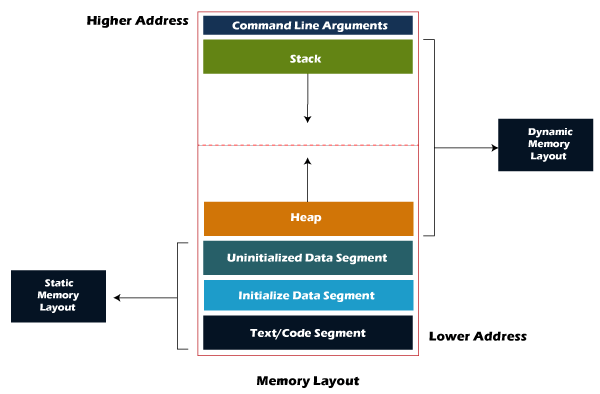
Pools are basically places where we can store our beautiful variables. First of all, we have to understand that any memory used in general, should be freed after use (freeing is referring to telling the CPU that you don’t need this particular memory anymore) this kind of freeing is divided into 2 types, the compiler free based,(which is what are we gonna discover soon with “stack” and “static’) and the heap is when the actual C fun starts, where you, YES YOU, the developer will have the power to free this kind of memory.
The stack
The stack is used to store variables used inside a specific scope(IT’S NOT BY DEFAULT A FUNCTION), it can be a function or simply a block(including the main() function).
// In this example those vars are local to the hole function
void themostamazingfunctioneven(int something, char *smthelse)
{
  int mybeautifulvar = 5;
  char *mybeautifulstring = "Cool huh";

  // ... Some other code here
}
// Now let see something more interesting
void themostamazingfunctioneven(int something, char *smthelse)
{
  int mybeautifulvar = 5;
  {
      char *mybeautifulstring = "Cool huh";
  }
  printf("Where is mybeautifulstring ? %s\n", mybeautifulstring);
  // ... Some other code here
}
// In the second example mybeautifulstring is only local inside its block
// that means that this second function gonna print an error : )
Remember local variables are only local inside their block, not always a function. Another thing is when allocating variables on the stack, that means the compiler will handle it, it’s handing the job of telling the CPU that we don’t need these variables, to the compiler, which means that the variables are automatically destroyed (or freed) after the function execution is done, now let’s dive a bit more into, the HOW this part is made. (If you are just a beginner you can jump over the next part directly to the summary).
It’s a LIFO, “Last-In,-First-Out”, structure. Every time a function declares a new variable it is “pushed” onto the stack. Then when a function finishes running, all the variables associated with that function on the stack are deleted, and the memory they use is freed up. This leads to the “local” scope of function variables. The stack is a special region of memory, and is automatically managed by the CPU — so you don’t have to allocate or deallocate memory. Stack memory is divided into successive frames where each time a function is called, it allocates itself a fresh stack frame.
Note that there is generally a limit on the size of the stack — which can vary with the operating system (for example OSX currently has a default stack size of 8MB). If a program tries to put too much information on the stack, stack overflow will occur. Stack overflow happens when all the memory in the stack has been allocated, and further allocations begin overflowing into other sections of memory. Stack overflow also occurs in situations where recursion is incorrectly used.
A summary of the stack:
- the CPU manages the stack, there is no ability to modify it
- variables are allocated and freed automatically
- the stack is not limitless — most have an upper bound
- the stack grows and shrinks as variables are created and destroyed
- stack variables only live inside their function, which means they exist only while the function that created them exist
The Heap
The heap is the diametrical opposite of the stack. The heap is a large pool, (your RAM is the limit) of memory that can be used dynamically — it is also known as the “free store”. And this is where the fun starts, yes there is where most people complain, about how C is unsafe (usw). It’s an order-based restaurant, where you order your pizza with memory (I feel hungry now: /)in the compile time, and take it on delivery, on the run time. (The compile time is when your binary is getting compiled, and the run time is when your binary is being run or executed). This is the memory that is not automatically managed — you have to explicitly allocate (using functions such as malloc, which is the ordering process that I talked about), and deallocate the memory (using free), which is picking up your leftover and throwing it into the trash (It will stink your memory if it stays there 🤧). And here is where the pain starts.

Keeping track of every allocation in big a\\ projects can be challenging especially if you are writing code with your own feet (I mean hands but it kinda sometimes looks like, some people are using something else). If you don’t keep track of your allocations correctly you will end up with a bunch of leaks all over your code, now congratulations, you have to spend another week looking for those leaks and cleaning them. Seems like a hassle right?
To solve this issue you have to swear your diligence to the compiler, submit your whole will to it, and ask for forgiveness, only then you won’t have any memory leaks :\| I should stop with those bad jokes lmao, so again to solve this issue, you simply should have the discipline, to write proper C code, yes you only need to follow some specific conventions and then I can guarantee that you won’t suffer from that problem anymore. If you did read my other article “C from another perspective” you should have an idea, about what I am talking about now. If you don’t, give it a try, it will take you less than 10 minutes, to finish. I am waiting for you. Are you done? Okay, let's continue then. You heared me talking about blocks and scopes before right? Having this understanding of blocks is fundamental, you should understand how the compiler reads and compiler your own code, to own it and use it to build your magic spells.
// I always start writing my allocation like this
int main(int argc, char* argv[])
{
 struct elf_file elf;

 if (elf_file_create(&elf, argv[1])).  // <- Allocating the memo and resources for the elf object
 {
      // ...
      elf_file_destroy(&elf); // <- Destroying everything I did allocate in the create
 }
 return (0);
}
In that example, as you can see whenever I create a create function, I start immediately creating the destroy function which is by default the deallocator of the creation function, and as you go along you start adding more code in between, that why you are always sure that you are keeping track of your allocations and you know when you are freeing them.
As you can see, I write my code with the discipline of destroying everything allocated, this thing alone was the asset that helped me a lot in writing multiple big projects, without spending much time debugging and looking for leaks.
I said it before and I will say it again:
If C gives you a sword, learn how to use it, don’t cut yourself with it. This much flexibility is a feature not a bug 🐛 .
A summary of the heap:
- the heap is managed by the programmer, the ability to modify it is somewhat boundless.
- in C, variables are allocated and freed using functions like malloc() and free().
- the heap is large and is usually limited by the available physical memory (RAM).
- the heap requires pointers to access it.
Thanks for reading ❤️.
Resources:
https://www.scaler.com/topics/c/memory-layout-in-c/ https://www.embedded.com/memory-safety-in-c/ Advanced resources : https://opensource.com/article/21/8/memory-programming-c http://www.sunshine2k.de/articles/coding/cmemalloc/cmemory.html
Originally published on Medium.